https://www.youtube.com/watch?v=ED2H_y6dmC8
29:33
- Setup Prisma ORM
- Setup Postgres database
- Explore Prisma studio
- Test Prisma API
- Push to GitHub
- Create a new branch
- Create a new PR
- Review & merge
1. Prisma 패키지 설치
https://www.prisma.io/docs/guides/nextjs
How to use Prisma ORM and Prisma Postgres with Next.js and Vercel | Prisma Documentation
Learn how to use Prisma ORM in a Next.js app and deploy it to Vercel
www.prisma.io
- prisma: Prisma CLI 도구 (스키마 관리, 마이그레이션)
- @prisma/client: 데이터베이스와 통신하는 실제 클라이언트
- tsx: TypeScript 실행 도구
npm install prisma tsx --save-dev
npm install @prisma/client

---------------------------------

// 버전 적어서 설치하다가 type 오류 때문에 애먹었다.
// 그냥 강제로 바꾸고 안내창 뜨면 그거따라하는게 좋겠다.

npm install prisma@6.16.3 tsx@4.20.6 --save-exact --save-dev
npm install @prisma/client@6.16.3 --save-exact
설치된 패키지 버전:
"@prisma/client": "^6.16.3",
"prisma": "^6.16.3",
"tsx": "^4.20.6",
* package.json 에서 버전을 변경했다면? 안전빵 node_modules 삭제후 재설치
rm -rf node_modules
npm install
2. Prisma 초기화
- prisma/schema.prisma 파일 생성
- .env 파일 생성 (DATABASE_URL 포함)
npx prisma init
3. Neon Database 설정
Neon: 서버리스 PostgreSQL 데이터베이스 플랫폼
- 주요 특징:
- 클라우드 기반으로 별도 서버 관리 불필요
- 자동 스케일링 지원
- 무료 티어 제공으로 학습/개발에 적합
- PostgreSQL 완벽 호환
- 역할: 애플리케이션의 실제 데이터를 저장하고 관리하는 데이터베이스 서버
Neon Serverless Postgres — Ship faster
The database you love, on a serverless platform designed to help you build reliable and scalable applications faster.
neon.com

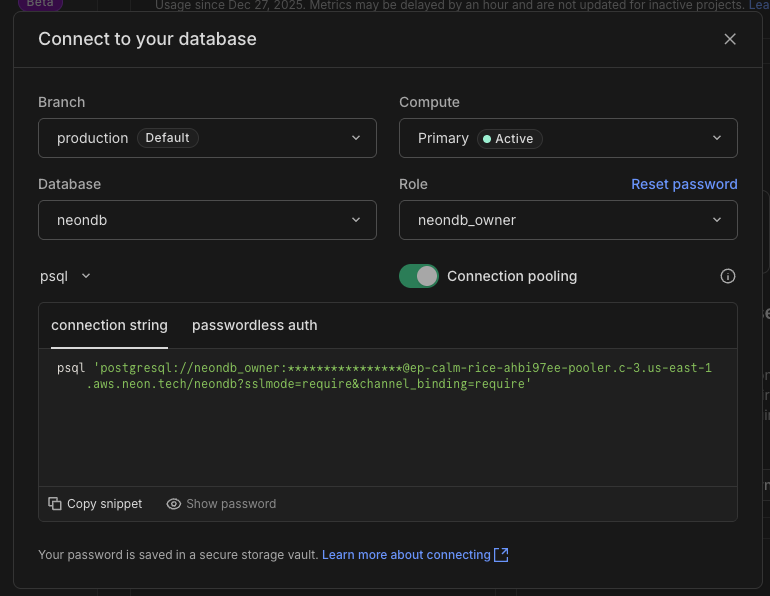
환경변수 설정 : .env 파일에 Neon Database URL 추가
#Database
DATABASE_URL="your-neon-database-url"
3. Prisma 스키마 정의
Prisma 설치

https://www.prisma.io/docs/guides/nextjs#22-define-your-prisma-schema
How to use Prisma ORM and Prisma Postgres with Next.js and Vercel | Prisma Documentation
Learn how to use Prisma ORM in a Next.js app and deploy it to Vercel
www.prisma.io
prisma/schema.prisma
- generator client: Prisma Client 생성 설정
- output: 생성될 클라이언트 위치 지정
- datasource db: 데이터베이스 연결 설정
- url = env("DATABASE_URL"): .env 파일의 DATABASE_URL 환경변수를 읽어옴
- 의문점: url = env("DATABASE_URL") 는 사이트에 없움....
- model User: 사용자 테이블 정의
- model Post: 게시글 테이블 정의 (User와 관계 설정)
// This is your Prisma schema file,
// learn more about it in the docs: https://pris.ly/d/prisma-schema

// Looking for ways to speed up your queries, or scale easily with your serverless or edge functions?
// Try Prisma Accelerate: https://pris.ly/cli/accelerate-init

generator client {
  provider = "prisma-client"
  output   = "../src/generated/prisma"
}

datasource db {
  provider = "postgresql"
  url      = env("DATABASE_URL")
}

model User {
  id    Int     @id @default(autoincrement())
  email String  @unique
  name  String?
  posts Post[]
}

model Post {
  id        Int     @id @default(autoincrement())
  title     String
  content   String?
  published Boolean @default(false)
  authorId  Int
  author    User    @relation(fields: [authorId], references: [id])
}
5. Prisma 마이그레이션
- 스키마를 실제 데이터베이스에 적용
- migration.sql 파일 자동 생성
- Prisma Client 자동 생성
npx prisma migrate dev


**실행 결과:**

✔ Enter a name for the new migration: … init
Applying migration `20251227002352_init`

The following migration(s) have been created and applied from new schema changes:

prisma/migrations/
  └─ 20251227002352_init/
    └─ migration.sql

Your database is now in sync with your schema.

✔ Generated Prisma Client (6.19.1) to ./src/generated/prisma in 31msnpx prisma migrate dev
6. Prisma Studio
npx prisma studio
Prisma에 User를 추가해봄.
확인:
- Prisma Studio에서 데이터 추가
- Neon Database에도 추가된 것 확인 완료 ✅
Prisma Studio 역할:
- 브라우저 기반 데이터베이스 GUI
- 데이터 조회, 추가, 수정, 삭제 가능
- 개발 중 데이터 관리에 유용

neon 에도 추가된거 확인 :)

7. Prisma 클라이언트 설정
- 개발 환경에서 Hot Reload 시 Prisma Client가 여러 번 생성되는 것을 방지
- Production 환경에서는 매번 새로운 인스턴스 생성
src/lib/db.ts
import { PrismaClient } from "@/generated/prisma/client"

const globalForprisma = global as unknown as {
    prisma: PrismaClient
};

const prisma = globalForprisma.prisma || new PrismaClient();

if(process.env.NODE_ENV !== "production"){
    globalForprisma.prisma = prisma;
}

export default prisma
8. Prisma API 테스트
src/app/page.tsx
- user정보 가져와보기

import { Button } from "@/components/ui/button"
import prisma from "@/lib/db"

const Page = async() =>{

  const users = await prisma.user.findMany();

  return(
    <div className="min-h-screen min-w-screen flex items-center justify-center">
      {JSON.stringify(users)}
    </div>
  )
}

export default Page
9. Prisma Reset (필요시)
데이터베이스를 초기화하고 싶을 때:
npx prisma migrate reset
10. Git 브랜치 작업
# main 브랜치로 이동
git checkout main

# 최신 상태로 업데이트
git pull origin main

# 02-database 브랜치 병합
git merge 02-database

# 원격 저장소에 푸시
git push origin main
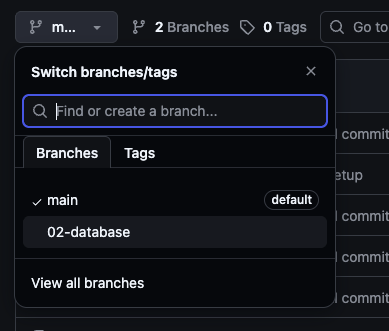
02-database 브런치를 새로 만들고 커밋해줌.
- 다시 main으로 돌아가 병합해줘야함. 아.....gitdesktop에 연결해놓고 다음작업 해야겠다. 기차넝


11. CodeRabbit 설정
CodeRabbit: AI 기반 자동 코드 리뷰 도구
- 주요 역할:
- Pull Request 자동 분석
- 코드 품질, 버그, 보안 이슈 검토
- 개선 제안 및 피드백 제공
- 코드 스타일 일관성 체크
- 장점:
- 24/7 즉각적인 코드 리뷰
- 팀 코드 리뷰 전 1차 검토로 시간 절약
- 학습 자료로도 활용 가능
AI Code Reviews | CodeRabbit | Try for Free
AI-first pull request reviewer with context-aware feedback, line-by-line code suggestions, and real-time chat.
www.coderabbit.ai
coderabbit 설치

'Clone Coding' 카테고리의 다른 글
| N8N & Zapier - Authentication (0) | 2025.12.31 |
|---|---|
| N8N & Zapier - tRPC 설정 (1) | 2025.12.29 |
| N8N & Zapier - setup (0) | 2025.12.26 |
| N8N & Zapier - 작업 할 내용 (0) | 2025.12.26 |
| Jira-clone - Next.js 빌드 시 타입 오류 무시하고 강제 빌드하기 (0) | 2025.12.13 |


