https://www.youtube.com/watch?v=Av9C7xlV0fA
7:12:05
1. DELETE API 엔드포인트
- 워크스페이스 삭제 DELETE 메서드
src/features/workspaces/server/route.ts
- 권한 검증: ADMIN만 삭제 가능 → 무단 삭제 방지
- 캐스케이드 삭제 예정: 워크스페이스 삭제 시 연관된 멤버, 프로젝트, 작업도 함께 삭제 (현재 TODO)
- 문서 삭제: 데이터베이스에서 워크스페이스 문서 제거
.delete(
    "/:workspaceId",
    sessionMiddleware,
    async (c) => {
        const databases = c.get("databases");
        const user = c.get("user");

        const {workspaceId} = c.req.param();

        // 1. 권한 확인
        const member = await getMember({
            databases,
            workspaceId,
            userId: user.$id,
        })

        if(!member || member.role !== MemberRole.ADMIN){
            return c.json({error:"Unauthorized"}, 401)
        }

        // TODO: Delete members, projects, and tasks

        // 2. 워크스페이스 삭제
        await databases.deleteDocument(
            DATABASE_ID,
            WORKSPACES_ID,
            workspaceId,
        )

        return c.json({data:{ $id: workspaceId}});
    }
)
2. 클라이언트 훅 - useDeleteWorkspace
- React Query를 사용한 mutation 훅
src/features/workspaces/api/use-delete-workspace.ts
- 삭제 성공 시 두 가지 쿼리 캐시 무효화
- 삭제된 워크스페이스는 목록에서 제거됨
import { toast } from 'sonner';
import {useMutation, useQueryClient} from '@tanstack/react-query'
import { InferRequestType, InferResponseType } from 'hono';

import {client} from '@/lib/rpc'

type ResponseType = InferResponseType<typeof client.api.workspaces[":workspaceId"]['$delete'], 200>
type RequestType = InferRequestType<typeof client.api.workspaces[":workspaceId"]['$delete']>


export const useDeleteWorkspace = () => {
    const queryClient = useQueryClient()

    const mutation = useMutation<ResponseType, Error, RequestType>({
        mutationFn: async({param}) => {
            const response = await client.api.workspaces[':workspaceId']['$delete']({param});

            if(!response.ok){
                throw new Error("Failed to delete Workspace")
            }

            return await response.json()
        },
        onSuccess: ({data}) => {
            toast.success("Workspace deleted")
            queryClient.invalidateQueries({queryKey : ['workspaces']})
            queryClient.invalidateQueries({queryKey : ['workspace', data.$id]})
        },
        onError: () => {
            toast.error("Failed to delete Workspace")
        }
    })
    return mutation
}
3. 확인 다이얼로그 커스텀 훅
- useConfirm 훅 - 재사용 가능한 확인 창( 사용자가 중요한 작업(삭제 등)을 수행하기 전에 확인 창을 띄우는 훅)
// src/hooks/use-confirm.tsx

import { ResponsiveModal } from "@/components/responsive-modal"
import { Button, ButtonProps } from "@/components/ui/button";
import { Card, CardContent, CardHeader, CardTitle, CardDescription,} from "@/components/ui/card"
import { useState } from "react"

export const useConfirm = (
    title: string,
    message: string,
    variant: ButtonProps["variant"] = "primary"
): [() => JSX.Element, () => Promise<unknown>] => {

    const [promise, setPromise] = useState<{
        resolve: (value: boolean) => void
    } | null>(null)

    // 새로운 확인 프롬프트 생성
    const confirm = () => {
        return new Promise((resolve) => {
            setPromise({resolve})
        })
    }

    const handleClose = () => {
        setPromise(null)
    }

    const handleConfirm = () => {
        promise?.resolve(true);   // true 반환
        handleClose();
    }

    const handleCancel = () => {
        promise?.resolve(false);  // false 반환
        handleClose();
    }

    // JSX 컴포넌트
    const ConfirmationDialog = () => (
        <ResponsiveModal open={promise !== null} onOpenChange={handleClose}>
            <Card className="w-full h-full border-none shadow-none">
                <CardContent className="pt-8">
                    <CardHeader className="p-0">
                        <CardTitle>{title}</CardTitle>
                        <CardDescription>{message}</CardDescription>
                    </CardHeader>
                    <div className="pt-4 w-full flex gap-y-2 lg:flex-row gap-x-2 items-center justify-end">
                        <Button onClick={handleCancel} variant="outline" className="w-full lg:w-auto">
                            Cancel
                        </Button>
                        <Button onClick={handleConfirm} variant={variant} className="w-full lg:w-auto">
                            Confirm
                        </Button>
                    </div>
                </CardContent>
            </Card>
        </ResponsiveModal>
    )


    return [ConfirmationDialog, confirm]
}
4. EditWorkspaceForm에 삭제 기능 통합
// src/features/workspaces/components/edit-workspace-form.tsx

export const EditWorkspaceForm = ({onCancel, initialValues} : EditWorkspaceFormProps) => {
    const router = useRouter()
    const {mutate, isPending} = useUpdateWorkspace();
    const {mutate: deleteWorkspace, isPending: isDeletingWorkspace} = useDeleteWorkspace()

    // ✅ 확인 다이얼로그 생성
    const [DeleteDialog, confirmDelete] = useConfirm(
        "Delete Workspace",
        "This action cannot be undone",
        "destructive"
    )

    const handleDelete = async () => {
        // 1. 사용자 확인 대기
        const ok = await confirmDelete();

        if(!ok) return;

        // 2. 삭제 요청
        deleteWorkspace({
            param: {workspaceId: initialValues.$id},
        }, {
            onSuccess: () => {
                // 3. 워크스페이스 없으면 생성 페이지로 리다이렉트
                window.location.href = "/"
            }
        })
    }

    return(
        <div className="flex flex-col gap-y-4">
            <DeleteDialog/>  {/* 확인 다이얼로그 렌더링 */}

            {/* 기본 정보 수정 카드 */}
            <Card>
                {/* ... 이름, 이미지 수정 ... */}
            </Card>

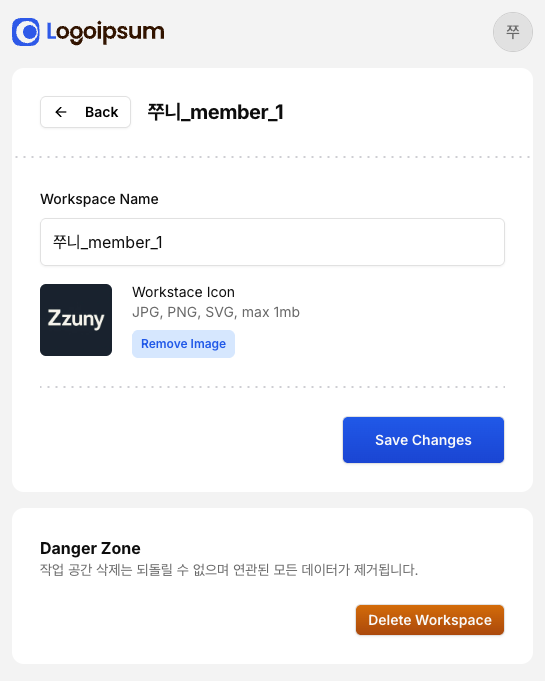
            {/* Danger Zone - 삭제 영역 */}
            <Card className="w-full h-full border-none shadow-none">
                <CardContent className="p-7">
                    <div className="flex flex-col">
                        <h3 className="font-bold">Danger Zone</h3>
                        <p className="text-sm text-muted-foreground">
                            작업 공간 삭제는 되돌릴 수 없으며 연관된 모든 데이터가 제거됩니다.
                        </p>
                        <Button
                            className="mt-6 w-fit ml-auto"
                            size="sm"
                            variant="destructive"
                            type="button"
                            disabled={isPending || isDeletingWorkspace}
                            onClick={handleDelete}
                        >
                            Delete Workspace
                        </Button>
                    </div>
                </CardContent>
            </Card>
        </div>
    )
}
4. EditWorkspaceForm에 삭제 기능 통합
src/features/workspaces/components/edit-workspace-form.tsx 삭제 버튼 구현
export const EditWorkspaceForm = ({onCancel, initialValues} : EditWorkspaceFormProps) => {
    const router = useRouter()
    const {mutate, isPending} = useUpdateWorkspace();
    const {mutate: deleteWorkspace, isPending: isDeletingWorkspace} = useDeleteWorkspace()

    // ✅ 확인 다이얼로그 생성
    const [DeleteDialog, confirmDelete] = useConfirm(
        "Delete Workspace",
        "This action cannot be undone",
        "destructive"
    )

    const handleDelete = async () => {
        // 1. 사용자 확인 대기
        const ok = await confirmDelete();

        if(!ok) return;

        // 2. 삭제 요청
        deleteWorkspace({
            param: {workspaceId: initialValues.$id},
        }, {
            onSuccess: () => {
                // 3. 워크스페이스 없으면 생성 페이지로 리다이렉트
                window.location.href = "/"
            }
        })
    }

    return(
        <div className="flex flex-col gap-y-4">
            <DeleteDialog/>  {/* 확인 다이얼로그 렌더링 */}

            {/* 기본 정보 수정 카드 */}
            <Card>
                {/* ... 이름, 이미지 수정 ... */}
            </Card>

            {/* Danger Zone - 삭제 영역 */}
            <Card className="w-full h-full border-none shadow-none">
                <CardContent className="p-7">
                    <div className="flex flex-col">
                        <h3 className="font-bold">Danger Zone</h3>
                        <p className="text-sm text-muted-foreground">
                            작업 공간 삭제는 되돌릴 수 없으며 연관된 모든 데이터가 제거됩니다.
                        </p>
                        <Button
                            className="mt-6 w-fit ml-auto"
                            size="sm"
                            variant="destructive"
                            type="button"
                            disabled={isPending || isDeletingWorkspace}
                            onClick={handleDelete}
                        >
                            Delete Workspace
                        </Button>
                    </div>
                </CardContent>
            </Card>
        </div>
    )
}
! window.location.href 와 router.push() 차이
// ❌ router.push()만 사용하면 문제
router.push("/")
// → 캐시된 워크스페이스 데이터가 남아있을 수 있음

// ✅ window.location.href 사용
window.location.href = "/"
// → 페이지 완전히 새로고침
// → 모든 상태/캐시 초기화
// → 워크스페이스 목록이 비어 있으면 생성 페이지로 자동 리다이렉트
6. Tailwind 설정 업데이트
tailwind.config.ts
- use-confirm.tsx 훅 내부의 Tailwind 클래스들이 빌드에 포함되어야 함
- 이 파일을 스캔하지 않으면 스타일이 누락될 수 있음
const config: Config = {
    content: [
        "./src/pages/**/*.{js,ts,jsx,tsx,mdx}",
        "./src/components/**/*.{js,ts,jsx,tsx,mdx}",
        "./src/app/**/*.{js,ts,jsx,tsx,mdx}",
        "./src/features/**/*.{js,ts,jsx,tsx,mdx}",
        "./src/hooks/**/*.{js,ts,jsx,tsx,mdx}",  // ✅ 추가
    ],
    // ...
}
7. DELETE HTTP 메서드 등록
src/app/api/[[...route]]/route.ts
- API 엔드포인트가 존재해도 HTTP 메서드를 export하지 않으면 405 에러 발생
- GET, POST, PATCH와 함께 DELETE도 명시적으로 내보내야 함
export const GET = handle(routes)
export const POST = handle(routes)
export const PATCH = handle(routes)
export const DELETE = handle(routes)  // ✅ DELETE 메서드 추가

export type AppType = typeof routes
흐름
DELETE 엔드포인트: 권한 확인 후 워크스페이스 삭제
useDeleteWorkspace 훅: 삭제 요청 및 캐시 관리
useConfirm 훅: 재사용 가능한 확인 다이얼로그
Promise 기반: async/await로 깔끔한 제어 흐름
Danger Zone UI: 비가역적 작업임을 시각적 강조
window.location.href: 삭제 후 완전한 상태 초기화
Tailwind 설정: 훅 폴더 추가로 스타일 포함
DELETE 메서드: API 라우트에서 명시적 export
'Clone Coding' 카테고리의 다른 글
| Jira-clone - 워크스페이스 초대 링크 기능 (0) | 2025.10.12 |
|---|---|
| Jira-clone - 워크스페이스 초대 링크 기능 구현 (0) | 2025.10.12 |
| Jira-clone - 서버 쿼리 리팩토링 (0) | 2025.10.11 |
| Jira-clone - 워크스페이스 수정(Update) 기능 구현 (0) | 2025.10.10 |
| Jira-clone - 독립 실행형 레이아웃과 워크스페이스 생성 페이지 구현 (0) | 2025.10.10 |


