https://www.youtube.com/watch?v=37v63U7-iG0&t=4s
- 에러 처리: try-catch를 제거하고 Next.js의 error.tsx로 에러 자동 처리
- 로딩 처리: 각 경로별 loading.tsx로 로딩 상태 표시
- 캐시 무효화: mutation 성공 시 router.refresh()와 queryClient.invalidateQueries() 함께 사용
- 이미지 처리: File 객체와 Appwrite 이미지 ID 모두 처리 가능하도록 구현
- 권한 체크: getMember로 사용자 권한 확인 후 Unauthorized 에러 throw
- 리다이렉팅: 프로젝트 생성/삭제 후 적절한 페이지로 이동
1. 프로젝트 클릭 시 URL 수정
문제: 프로젝트 클릭 시 URL에 null이 표시됨
http://localhost:3000/workspaces/6901bdd400275a8b8473/projects/null
해결: src/components/projects.tsx에서 URL 수정
// const href = `/workspaces/${workspaceId}/projects/${projectId}`
const href = `/workspaces/${workspaceId}/projects/${project.$id}`
2. Project 타입 정의
src/features/projects/type.ts
import {Models} from "node-appwrite";

export type Project = Models.Document & {
    name: string;
    imageUrl: string;
    workspaceId: string;
}
3. getProject 쿼리 함수 생성
src/features/projects/queries.ts
import { getMember } from "@/features/members/utils";
import { DATABASE_ID, PROJECTS_ID } from "@/config";
import { createSessionClient } from "@/lib/appwrite";
import { Project } from "./type";

interface GetProjectProps{
    projectId:string
}

export const getProject = async ({projectId} : GetProjectProps) => {
    const {databases, account} = await createSessionClient();
    const user = await account.get();

    const project = await databases.getDocument<Project>(
        DATABASE_ID,
        PROJECTS_ID,
        projectId
    );

    const member = await getMember({
        databases,
        userId:user.$id,
        workspaceId:project.workspaceId
    })

    if(!member){
        throw new Error("Unauthorized")
    }

    return project
}
4. Project ID 페이지 생성
src/app/(dashboard)/workspaces/[workspaceId]/projects/[projectId]/page.tsx
import { getCurrent } from "@/features/auth/queries";
import { getProject } from "@/features/projects/queries";
import { redirect } from "next/navigation";

interface ProjectIdPageProps{
    params: { projectId: string}
}

const ProjectIdPage = async({
    params,
}:ProjectIdPageProps) => {
    const user = await getCurrent();
    if(!user) redirect("/sign-in");

    const initialValues = await getProject({
        projectId: params.projectId
    })

    return(
        <div>
            ProjectId: {params.projectId} <br/>
            {JSON.stringify(initialValues)}
        </div>
    )
}

export default ProjectIdPage;
5. 전역 에러 페이지 생성
src/app/error.tsx
"use client"

import { Button } from "@/components/ui/button"
import { AlertTriangle } from "lucide-react"
import Link from "next/link"

const ErrorPage = () => {
    return(
        <div className="h-screen flex flex-col gap-y-4 items-center justify-center">
            <AlertTriangle className="size-6"/>
            <p className="text-sm">
                Something went wrong
            </p>
            <Button variant="secondary" size="sm">
                <Link href="/">
                    Back to home
                </Link>
            </Button>
        </div>
    )
}

export default ErrorPage
6. 전역 로딩 페이지 생성
- 기존 파일 삭제: src/app/(dashboard)/loading.tsx
src/app/loading.tsx
"use client"

import { Loader } from "lucide-react"

const LoadingPage = () => {
    return(
        <div className="h-screen flex flex-col items-center justify-center">
            <Loader className="size-6 animate-spin text-muted-foreground"/>
        </div>
    )
}

export default LoadingPage
7. 각 경로별 에러/로딩 페이지 추가
다음 경로에 error.tsx와 loading.tsx 복사:
- src/app/(auth)
- src/app/(dashboard)
- src/app/(standalone)
test : !!!! src/features/projects/queries.ts // 에러페이지를 적용해보면 테스트만 하고 지워
import { getMember } from "@/features/members/utils";
import { DATABASE_ID, PROJECTS_ID } from "@/config";
import { createSessionClient } from "@/lib/appwrite";
import { Project } from "./type";

interface GetProjectProps{
    projectId:string
}

export const getProject = async ({projectId} : GetProjectProps) => {

    throw new Error("test")

    .... 기존 코드
}
8. try-catch 제거 (에러 페이지로 자동 이동)
src/features/workspaces/queries.ts
"use server"

import { Query } from 'node-appwrite'
import { DATABASE_ID, MEMBERS_ID, WORKSPACES_ID } from '@/config'
import { Workspace } from './type'
import { getMember } from '../members/utils'
import { createSessionClient } from '@/lib/appwrite'

export const getWorkspaces = async () => {
    const { databases, account } = await createSessionClient();
    const user = await account.get();

    const members = await databases.listDocuments(
        DATABASE_ID,
        MEMBERS_ID,
        [Query.equal("userId", user.$id)]
    );

    if(members.total === 0){
        return {documents: [], total:0}
    }

    const workspaceIds = members.documents.map((member) => member.workspaceId)

    const workspace = await databases.listDocuments(
        DATABASE_ID,
        WORKSPACES_ID,
        [
            Query.orderDesc("$createdAt"),
            Query.contains("$id", workspaceIds)
        ]
    );

    return workspace
}

interface GetWorkspaceProps{
    workspaceId:string
}

export const getWorkspace = async ({workspaceId}:GetWorkspaceProps) => {
    const {databases, account} = await createSessionClient();
    const user = await account.get();

    const member = await getMember({
        databases,
        userId:user.$id,
        workspaceId
    })

    if(!member){
        throw new Error("Unauthorized")
    }

    const workspace = await databases.getDocument<Workspace>(
        DATABASE_ID,
        WORKSPACES_ID,
        workspaceId
    );

    return workspace
}

interface GetWorkspaceInfoProps{
    workspaceId:string
}

export const getWorkspaceInfo = async ({workspaceId}:GetWorkspaceInfoProps) => {
    const {databases} = await createSessionClient();

    const workspace = await databases.getDocument<Workspace>(
        DATABASE_ID,
        WORKSPACES_ID,
        workspaceId
    )

    return {
        name: workspace.name
    }
}
9. 프로젝트 업데이트 스키마 추가
src/features/projects/schemas.ts
...

export const updateProjectSchema = z.object({
    name: z.string().trim().min(1, "Minimum 1 character required").optional(),
    image : z.union([
        z.instanceof(File),
        z.string().transform((value) => value === "" ? undefined : value),
    ]).optional(),
})
10. 프로젝트 업데이트 API 엔드포인트
src/features/projects/server/route.ts
.patch(
    "/:projectId",
    sessionMiddleware,
    zValidator("form", updateProjectSchema),
    async (c) => {
        const databases = c.get("databases");
        const storage = c.get("storage");
        const user = c.get("user");

        const {projectId} = c.req.param();
        const {name, image} = c.req.valid("form");

        const existingProject = await databases.getDocument<Project>(
            DATABASE_ID,
            PROJECTS_ID,
            projectId
        )

        const member = await getMember({
            databases,
            workspaceId : existingProject.workspaceId,
            userId:user.$id
        })

        if(!member){
            return c.json({ error: "Unauthorized"}, 401)
        }

        let uploadedImageUrl : string | undefined

        if(image instanceof File){
            const file = await storage.createFile(
                IMAGES_BUCKET_ID,
                ID.unique(),
                image,
            );
            uploadedImageUrl = file.$id;
        }else{
            uploadedImageUrl = image
        }

        const project = await databases.updateDocument(
            DATABASE_ID,
            PROJECTS_ID,
            projectId,
            {
                ...(name && { name }),
                ...(uploadedImageUrl && { imageUrl: uploadedImageUrl }),
            }
        );

        return c.json({data:project})
    }
)
11. useUpdateProject Hook
src/features/projects/api/use-update-projects.ts
import { toast } from 'sonner';
import {useMutation, useQueryClient} from '@tanstack/react-query'
import { InferRequestType, InferResponseType } from 'hono';

import {client} from '@/lib/rpc'
import { useRouter } from 'next/navigation';

type ResponseType = InferResponseType<typeof client.api.projects[":projectId"]['$patch'], 200>
type RequestType = InferRequestType<typeof client.api.projects[":projectId"]['$patch']>

export const useUpdateProject = () => {

    const router = useRouter();
    const queryClient = useQueryClient()

    const mutation = useMutation<
        ResponseType,
        Error,
        RequestType
    >({
        mutationFn: async({form, param}) => {
            const response = await client.api.projects[":projectId"]["$patch"]({form, param});

            if(!response.ok){
                throw new Error("Failed to update projects")
            }

            return response.json()
        },
        onSuccess: ({data}) => {
            toast.success('Projects update')
            router.refresh();
            queryClient.invalidateQueries({queryKey : ['projects']})
            queryClient.invalidateQueries({queryKey : ['project', data.$id]})
        },
        onError: ()=> {
            toast.error("Failed to update projects")
        }
    })
    return mutation
}
12. 워크스페이스 업데이트 시 캐시 무효화 개선
src/features/workspaces/api/use-reset-invite-code.ts
onSuccess: ({data}) => {
    toast.success("Invite code reset")
    // 추가
    router.refresh()
    queryClient.invalidateQueries({queryKey : ['workspaces']})
    queryClient.invalidateQueries({queryKey : ['workspace', data.$id]})
},
src/features/workspaces/api/use-update-workspace.ts
onSuccess: ({data}) => {
    toast.success('Workspace updated')
	// 추가
    router.refresh()
    queryClient.invalidateQueries({queryKey : ['workspaces']})
    queryClient.invalidateQueries({queryKey : ['workspaces', data.$id]})
},
src/features/workspaces/component/edit-workspace-form.tsx
const onSubmit = (values: z.infer<typeof updateWorkspaceSchema>) => {
    const finalValues = {
        ...values,
        image: values.image instanceof File
        ? values.image
        : values.image && values.image !== ""
            ? values.image
            : "",
    };

    mutate({
        form:finalValues,
        param: {workspaceId: initialValues.$id}
    }, {
        onSuccess:({data})=>{
            form.reset();
            // router.push 삭제됨
        }
    })
}

const handleResetInviteCode = async () => {
    const ok = await confirmReset();
    if(!ok) return;

    resetInviteCode({
        param: {workspaceId:initialValues.$id},
    })
    // onSuccess 콜백 삭제됨
}
13. 프로젝트 Settings 페이지 생성
src/app/(standalone)/workspaces/[workspaceId]/projects/[projectId]/settings/page.tsx
const ProjectIdSettingsPage = () => {
    return(
        <div>
            Settings Page
        </div>
    )
}

export default ProjectIdSettingsPage

14. 워크스페이스 Settings 페이지 수정
src/app/(standalone)/workspaces/[workspaceId]/settings/page.tsx
import { getCurrent } from "@/features/auth/queries";
import { getWorkspace } from "@/features/workspaces/queries";
import { EditWorkspaceForm } from "@/features/workspaces/component/edit-workspace-form";
import { redirect } from "next/navigation";

interface WorkspaceIdSettingsPageProps{
    params:{
        workspaceId:string
    }
}


const WorkspaceIdSettingsPage = async ({params}:WorkspaceIdSettingsPageProps) => {

    const user = await getCurrent();
    if(!user) redirect('sign-in');

    const initialValues = await getWorkspace({workspaceId: params.workspaceId})

    // 삭제
    // if(!initialValues){
    //     redirect(`/workspaces/${params.workspaceId}`)
    // }


    return(
        <div className="w-full lg:max-w-xl">
            <EditWorkspaceForm initialValues={initialValues}/>
        </div>
    )
}

export default WorkspaceIdSettingsPage
15. EditProjectForm 컴포넌트 생성
src/features/projects/components/edit-project-form.tsx
'use client'
import { useRef } from "react";
import { useRouter } from "next/navigation";
import { zodResolver } from "@hookform/resolvers/zod";
import { updateProjectSchema } from "../schemas";
import { useForm } from "react-hook-form";
import z from "zod";
import { Card, CardContent, CardHeader, CardTitle } from "@/components/ui/card";
import { Form, FormControl, FormField, FormItem, FormLabel, FormMessage } from "@/components/ui/form";
import { Input } from "@/components/ui/input";
import { Button } from "@/components/ui/button";
import DottedSeparator from "@/components/dottedSeparator";
import { Avatar, AvatarFallback } from "@/components/ui/avatar";
import Image from "next/image";
import { ArrowLeftIcon, ImageIcon } from "lucide-react";
import { cn } from "@/lib/utils";
import { Project } from "../type";
import { APPWRITE_ENDPOINT, IMAGES_BUCKET_ID, PROJECT_ID } from "@/config";
import { useConfirm } from "@/hooks/use-confirm";
import { useUpdateProject } from "../api/use-update-projects";
interface EditProjectFormProps{
onCancel?: () => void;
initialValues:Project;
}
export const EditProjectForm = ({onCancel, initialValues} : EditProjectFormProps) =>{
const router = useRouter();
const {mutate, isPending} = useUpdateProject();
const inputRef = useRef<HTMLInputElement>(null)
const form = useForm<z.infer<typeof updateProjectSchema>>({
resolver: zodResolver(updateProjectSchema),
defaultValues:{
...initialValues,
image: initialValues.imageUrl ?? ""
}
})
const onSubmit = (values: z.infer<typeof updateProjectSchema>) => {
const finalValues = {
...values,
image: values.image instanceof File
? values.image
: values.image && values.image !== ""
? values.image
: "",
};
mutate({
form:finalValues,
param: {projectId: initialValues.$id}
}, {
onSuccess:({data})=>{
form.reset();
}
})
}
const handleImageChange = (e:React.ChangeEvent<HTMLInputElement>) => {
const file = e.target.files?.[0];
if(file){
form.setValue("image", file)
}
}
const [DeleteDialog, confirmDelete] = useConfirm(
"Delete Workspace",
"This action cannot be undone",
"destructive"
)
const handleDelete = async () => {
const ok = await confirmDelete();
if(!ok) return;
// 삭제 로직은 아직 구현 안됨
}
return(
<div className="flex flex-col gap-y-4">
<DeleteDialog/>
<Card className="w-full h-full border-none shadow-none">
<CardHeader className="flex flex-row items-center gap-x-4 p-7 space-y-0">
<Button
size='sm'
variant="secondary"
onClick={onCancel?
onCancel : ()=> router.push(`/workspaces/${initialValues.workspaceId}/projects/${initialValues.$id}`)}
>
<ArrowLeftIcon className="size-4 mr-2"/>
Back
</Button>
<CardTitle className="text-xl font-bold">
{initialValues.name}
</CardTitle>
</CardHeader>
<div className="px=7">
<DottedSeparator/>
</div>
<CardContent className="p-7">
<Form {...form}>
<form onSubmit={form.handleSubmit(onSubmit)}>
<div className="flex flex-col gap-y-4">
<FormField
control={form.control}
name="name"
render={({field})=>(
<FormItem>
<FormLabel>Project Name</FormLabel>
<FormControl>
<Input
{...field}
placeholder="Enter Project name"
/>
</FormControl>
<FormMessage/>
</FormItem>
)}
/>
<FormField
control={form.control}
name="image"
render={({field})=>(
<div className="flex flex-col gap-y-2">
<div className="flex items-center gap-x-5">
{field.value? (
<div className="size-[72px] relative rounded-md overflow-hidden">
<Image
alt="Logo"
fill
className="object-cover"
src={field.value instanceof File
? URL.createObjectURL(field.value)
: field.value ?
`${APPWRITE_ENDPOINT.startsWith('https://') ? APPWRITE_ENDPOINT : `https://${APPWRITE_ENDPOINT}`}/storage/buckets/${IMAGES_BUCKET_ID}/files/${field.value}/view?project=${PROJECT_ID}`
: '/placeholder.png'
}
/>
</div>
):(
<Avatar className="size=[72px]">
<AvatarFallback>
<ImageIcon className="size-[36px] text-neutral-400"/>
</AvatarFallback>
</Avatar>
)}
<div className="flex flex-col">
<p className="text-sm">Project Icon</p>
<p className="text-sm text-muted-foreground">
JPG, PNG, SVG, max 1mb
</p>
<input
className="hidden"
type="file"
accept=".jpg, .png, .svg"
ref={inputRef}
onChange={handleImageChange}
disabled={isPending}
/>
{field.value ? (
<Button
type="button"
disabled={isPending}
variant="tertiary"
size="xs"
className="w-fit mt-2"
onClick={()=>inputRef.current?.click()}
>
Remove Image
</Button>
):(
<Button
type="button"
disabled={isPending}
variant="tertiary"
size="xs"
className="w-fit mt-2"
onClick={()=>inputRef.current?.click()}
>
Upload Image
</Button>
)}
</div>
</div>
</div>
)}
/>
</div>
<DottedSeparator className="py-7"/>
<div className="flex items-center justify-between">
<Button
type="button"
size="lg"
variant='secondary'
onClick={onCancel}
disabled={isPending}
className={cn(!onCancel && "invisible")}
>
Cancel
</Button>
<Button
type="submit"
size="lg"
disabled={isPending}
>
Save Changes
</Button>
</div>
</form>
</Form>
</CardContent>
</Card>
<Card className="w-full h-full border-none shadow-none">
<CardContent className="p-7">
<div className="flex flex-col">
<h3 className="font-bold">Danger Zone</h3>
<p className="text-sm text-muted-foreground">
프로젝트 삭제는 되돌릴 수 없으며 연관된 모든 데이터가 제거됩니다.
</p>
<Button
className="mt-6 w-fit ml-auto"
size="sm"
variant="destructive"
type="button"
disabled={isPending}
onClick={handleDelete}
>
Delete Project
</Button>
</div>
</CardContent>
</Card>
</div>
)
}
EditProjectForm 적용
src/app/(standalone)/workspaces/[workspaceId]/projects/[projectId]/settings/page.tsx
import { getCurrent } from "@/features/auth/queries"
import { EditProjectForm } from "@/features/projects/components/edit-project-form";
import { getProject } from "@/features/projects/queries";
import { redirect } from "next/navigation";

interface ProjectIdSettingsPageProps{
    params: {
        projectId: string;
    }
}

const ProjectIdSettingsPage = async({
    params,
}:ProjectIdSettingsPageProps) => {

    const user = await getCurrent();
    if(!user) redirect("/sign-in");

    const initialValues = await getProject({
        projectId: params.projectId
    })

    return(
        <div className="w-full lg:max-w-xl">
            <EditProjectForm initialValues={initialValues}/>
        </div>
    )
}

export default ProjectIdSettingsPage
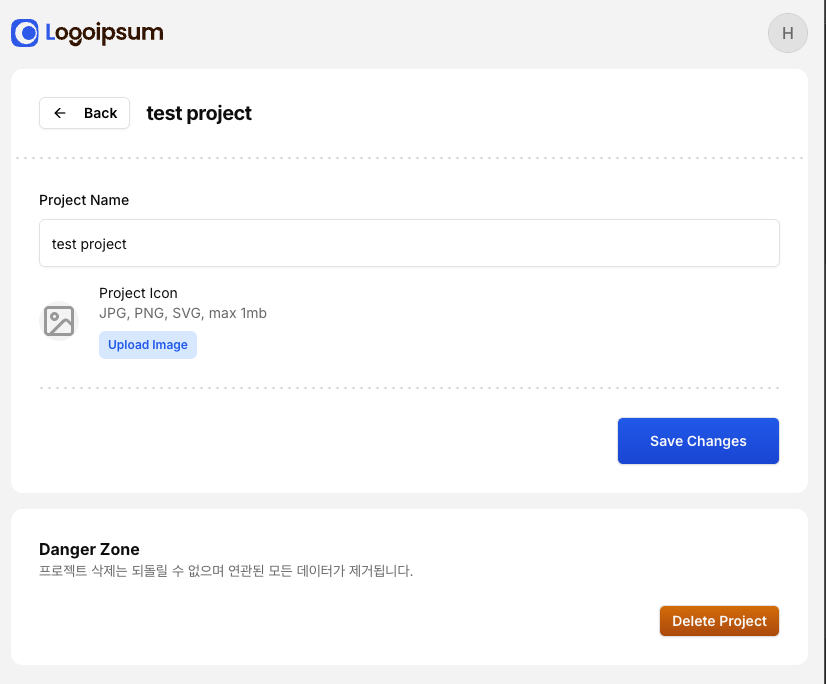
16. 프로젝트 삭제 API 엔드포인트
src/features/projects/server/route.ts
.delete(
    "/:projectId",
    sessionMiddleware,
    async (c) => {
        const databases = c.get("databases");
        const user = c.get("user");

        const {projectId} = c.req.param();

        const existingProject = await databases.getDocument<Project>(
            DATABASE_ID,
            PROJECTS_ID,
            projectId
        )

        const member = await getMember({
            databases,
            workspaceId : existingProject.workspaceId,
            userId: user.$id,
        })

        if(!member){
            return c.json({error:"Unauthorized"}, 401)
        }

        // TODO: Delete tasks

        await databases.deleteDocument(
            DATABASE_ID,
            PROJECTS_ID,
            projectId,
        )

        return c.json({data:{ $id: existingProject.$id}});
    }
)
17. useDeleteProject Hook
src/features/projects/api/use-delete-projects.ts
import { toast } from 'sonner';
import {useMutation, useQueryClient} from '@tanstack/react-query'
import { InferRequestType, InferResponseType } from 'hono';

import {client} from '@/lib/rpc'
import { useRouter } from 'next/navigation';

type ResponseType = InferResponseType<typeof client.api.projects[":projectId"]['$delete'], 200>
type RequestType = InferRequestType<typeof client.api.projects[":projectId"]['$delete']>

export const useDeleteProject = () => {

    const router = useRouter();
    const queryClient = useQueryClient()

    const mutation = useMutation<
        ResponseType,
        Error,
        RequestType
    >({
        mutationFn: async({param}) => {
            const response = await client.api.projects[":projectId"]["$delete"]({param});

            if(!response.ok){
                throw new Error("Failed to delete projects")
            }

            return response.json()
        },
        onSuccess: ({data}) => {
            toast.success('Projects delete')
            router.refresh();
            queryClient.invalidateQueries({queryKey : ['projects']})
            queryClient.invalidateQueries({queryKey : ['project', data.$id]})
        },
        onError: ()=> {
            toast.error("Failed to delete projects")
        }
    })
    return mutation
}
18. EditProjectForm에 삭제 기능 추가
src/features/projects/components/edit-project-form.tsx
// import 추가
import { useDeleteProject } from "../api/use-delete-projects";

// 컴포넌트 내부에 추가
const {mutate: deleteProject, isPending:isDeletingProject} = useDeleteProject()

const [DeleteDialog, confirmDelete] = useConfirm(
    "Delete Project",
    "This action cannot be undone",
    "destructive"
)

const handleDelete = async () => {
    const ok = await confirmDelete();
    if(!ok) return;

    deleteProject({
        param: {projectId: initialValues.$id},
    }, {
        onSuccess: () => {
            window.location.href = `/workspaces/${initialValues.workspaceId}`
        }
    })
}
19. 프로젝트 생성 후 리다이렉팅 추가
src/features/projects/components/create-project-form.tsx
mutate({form:finalValues}, {
    onSuccess:({data})=>{
        form.reset();
        router.push(`/workspaces/${workspaceId}/projects/${data.$id}`);
    }
})
'Clone Coding' 카테고리의 다른 글
| Jira-clone - Task 생성 모달 및 폼 구현 정리 (0) | 2025.11.05 |
|---|---|
| Jira-clone - Tasks 기능 구현 (0) | 2025.11.05 |
| Jira-clone - Projects 기능 구현 (0) | 2025.10.29 |
| Jira-clone - 멤버 api 빌드 (0) | 2025.10.17 |
| Jira-clone - 워크스페이스 초대 링크 기능 (0) | 2025.10.12 |


